Free & Open Source
Desktop Application

Vail Zoomer

Send Morse code during your video calls. Vail Zoomer merges your voice with CW sidetone so everyone on your Zoom, Teams, or Discord call can hear your Morse code alongside your voice.

Vail Adapter Required

Vail Zoomer is designed exclusively for the Vail Adapter. Other USB CW key adapters are not supported and will not work with this application.
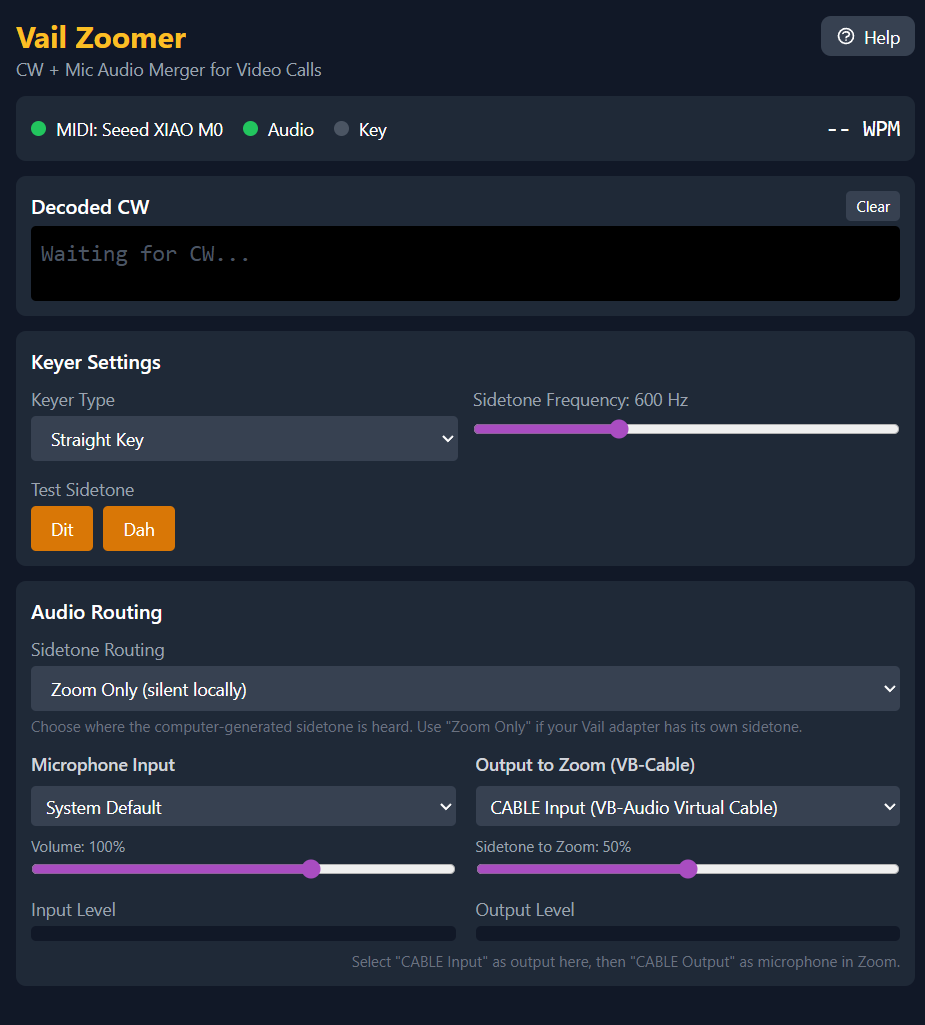
Vail Zoomer Application Screenshot

What Can You Do With Vail Zoomer?

Share Morse code with friends, practice groups, or anyone on a video call.

Share CW in Video Calls

Let others hear your Morse code during online meetings, practice sessions, or casual chats with fellow operators.

Talk and Key Together

Your voice and Morse code go through at the same time. Explain what you're sending while you send it.

See What You Send

Watch your Morse code decode on screen in real-time as you key. Great for checking your accuracy.

Built for Vail Adapter

Designed specifically to work with your Vail Adapter. Just plug in and start keying.

Adjustable Settings

Control sidetone volume and frequency. Choose your keyer type and adjust timing to match your style.

Flexible Audio Routing

Choose to hear sidetone locally, send it only to your call, or both. Works even if your adapter has built-in sidetone.

Download Vail Zoomer

Available for Windows and Linux. macOS coming soon.

Windows

Loading...

macOS

Coming Soon

Linux

Loading...

Want to help us test prerelease versions? Email Brett KE9BOS at ke9bos@pigletradio.org or join us on Discord for the prerelease files.

How It Works

Get set up in four simple steps.

1

Connect Your Adapter

Plug in your Vail Adapter via USB.

2

Choose Your Audio

Select your microphone and speakers in the app.

3

Set Up Your Video App

Choose "Vail Zoomer" as your microphone in Zoom, Teams, or Discord.

4

Start Keying

Everyone on the call hears your Morse code!

Stay Updated

Vail Zoomer is free and open source. Join the community or contribute on GitHub.